 川流不息
IPv4 addresses are increasingly scarce worldwide, and Chinese broadband ISPs now usually don’t provide a public IPv4 address — by default you only get a public IPv6 address. In that situation, reaching home resources from the internet requires an IPv6 path. Mobile carriers have rolled out IPv6 widely, so access from a mobile device over cellular data works fine. In practice, however, public networks such as offices and shopping malls generally only support IPv4, which leaves them completely cut off from the home network.
For this scenario, is there a technical way to achieve dual-stack IPv4/IPv6 access, so the home network is reachable transparently from any network environment? The answer is yes, with a few prerequisites:
- The home network needs a domain bound via DDNS (any subdomain level works), to cope with the home network’s changing IPv6 address. Here we’ll assume the domain is
home.xxxx.com. - A public server (such as a VPS), which normally has a fixed IP address, to act as a relay for IPv4 traffic.
Before reading on, you may want to look at my home network architecture to understand terms such as the home gateway.
DNS Configuration
A domain can have both an IPv4 A record and an IPv6 AAAA record. When the user is on an IPv4 network, DNS returns the A record; on an IPv6 network, it returns the AAAA record. If the user’s network supports both, the operating system decides whether to prefer IPv4 or IPv6, and modern operating systems usually prefer IPv6.
First, configure DNS with your DNS provider: for example, point the A record of home.xxxx.com to the VPS’s fixed IPv4 address and the AAAA record to the home gateway’s IPv6 address. Also set up an automated script on the home gateway so that whenever its IPv6 address changes, the new address is pushed to the DNS provider.
Forwarding IPv4 Traffic
How IPv4 traffic gets forwarded depends on which of two situations you’re in:
- The VPS supports both IPv4 and IPv6
- The VPS supports only IPv4
Port Forwarding with Socat
In the first case, where the VPS supports both IPv4 and IPv6, things are relatively easy: just use Socat’s IPv4-to-IPv6 port forwarding, as shown below:
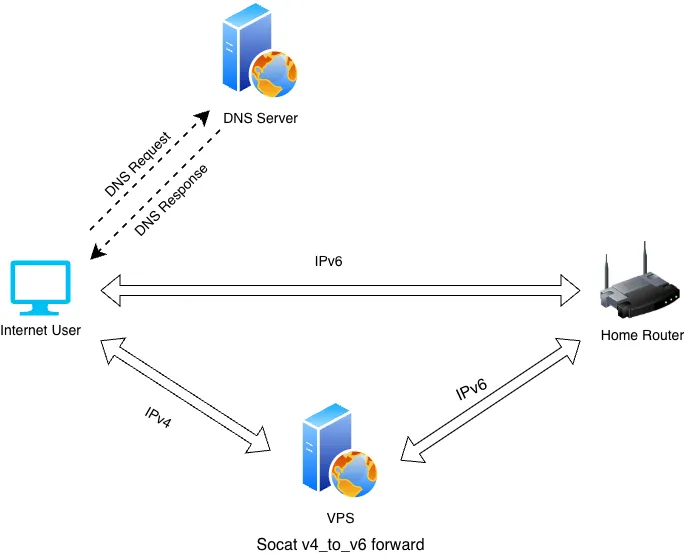
The VPS uses Socat to listen on an IPv4 port and forwards incoming requests to the home gateway over IPv6, making the home network reachable indirectly over IPv4.
Socat can convert between arbitrary IPv4 and IPv6 source and destination ports. In fact, we also need it on the home gateway to convert incoming IPv6 traffic to IPv4 and forward it to any device on the LAN.
Back when the home gateway still had a public IPv4 address, it was easy to set up NAT port forwarding on the gateway to expose internal ports to the internet and reach home devices (such as a NAS) from outside. In the IPv6 era, every device gets its own publicly reachable IPv6 address, so IPv6 itself doesn’t need NAT port forwarding — which is why open-source software like OpenWrt doesn’t offer IPv4-style NAT port forwarding for IPv6.
You could register a subdomain for every LAN device via DDNS and bind it to that device’s IPv6 address, which would also allow direct IPv6 access to home devices from outside. But configuring DDNS that way is extremely tedious, and it’s a security concern as well.
Using Socat keeps the experience the same as in the IPv4 days: only the home gateway is exposed to the outside, and all other home devices are reached through it.
Port Forwarding with FRP
In the second case, the VPS has only an IPv4 address, so it can’t establish an IPv6 path to the home gateway. And since the home gateway has no public IPv4 address, the VPS can’t reach it over IPv4 either.
This is where a second tool comes in: FRP, an open-source client/server application. The idea is fairly simple: the VPS can’t reach the home gateway directly, but the VPS does have a public IPv4 address. So we first run the server, FRPS, on the VPS, then run the client, FRPC, on the home gateway, which opens a TCP connection to FRPS. FRPS and FRPC can now communicate in both directions, which makes it possible to forward IPv4 requests from the internet to the home gateway.
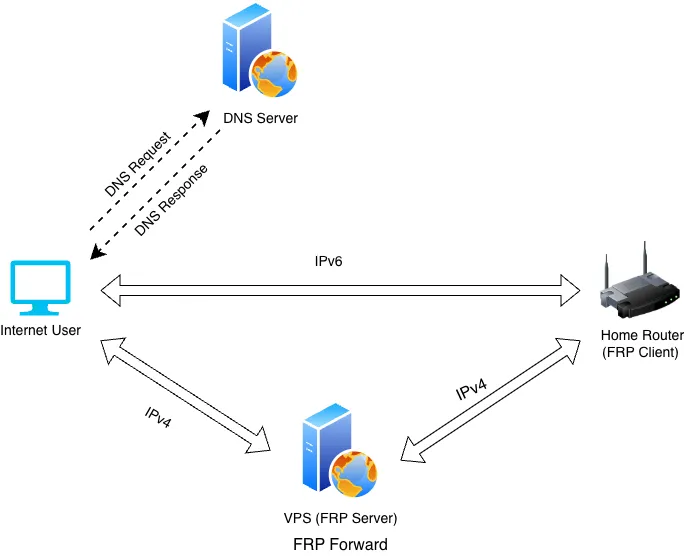
FRP calls this feature a reverse proxy; you can also think of it as a tunnel between FRPS and FRPC through which data is forwarded.
What’s interesting about this tool is that which ports the server listens on, which protocol it uses and which client port the traffic goes to are configured not on the server but on the client. The server only needs a single service port at startup; the rest of the configuration is sent by the client after it connects, and the server then starts listening and forwarding. This makes it very flexible to use.
The tool also supports connecting multiple clients to one server, making the most of the server’s forwarding capacity. FRP supports a rich set of network protocols as well; see the official documentation for details: FRP
Afterword
This post described how to provide the same transparent IPv4 access when the home network only has IPv6, and roughly introduced the use cases of two tools, Socat and FRP. Whichever tool you use, when traffic is relayed through a VPS, access speed is limited by the VPS’s inbound and outbound bandwidth and may differ greatly from direct IPv6 access. It may not suit high-volume traffic such as file transfers or video streaming. Be especially careful if your VPS bandwidth is billed by traffic.